
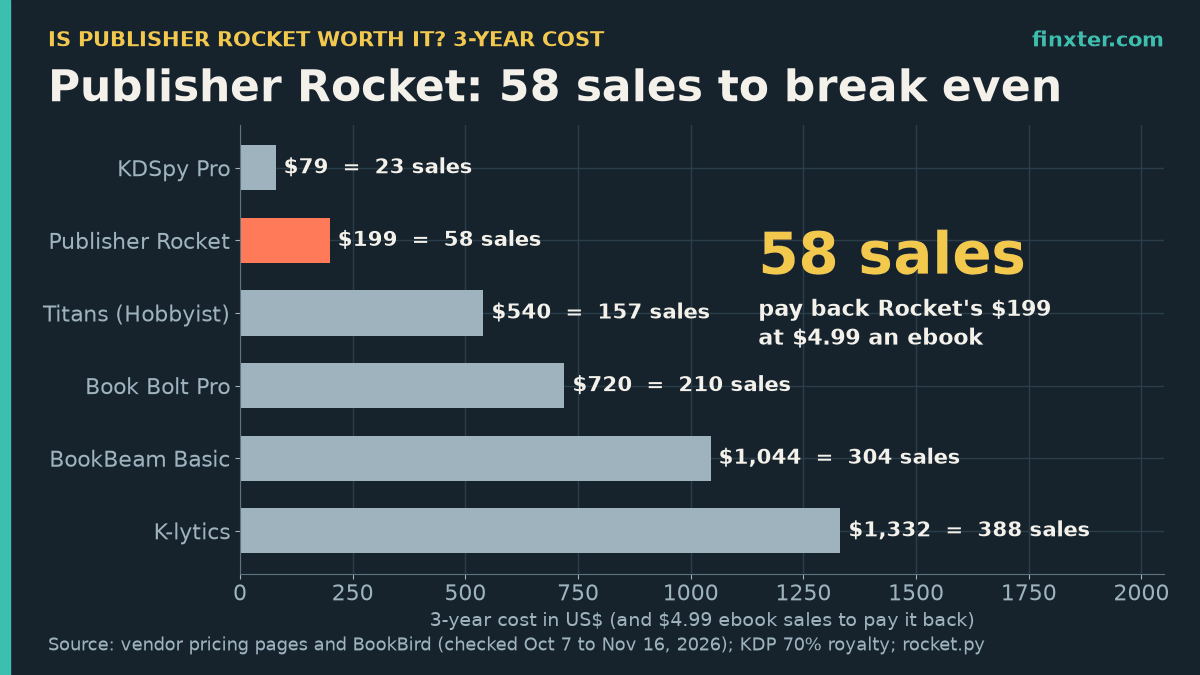
Short answer: Publisher Rocket is worth it if you publish more than a couple of books or run Amazon Ads, and not worth it for a single 99-cent book. It costs $199 once. At a $4.99 ebook, KDP pays you about $3.44 per sale, so Rocket pays for itself after 58 extra sales. At 99 cents, you’d need 575.
Spread over a 10-book catalog for three years, that’s 5.8 extra sales per book, or one extra sale per book every 6.2 months. Every subscription research tool I priced costs more by year two, and the gap grows from there.
Rocket helps you pick keywords and categories for books you already have. If your real bottleneck is having enough books for that research to pay off, a drafting tool like ImagineYourBook turns an idea into a full text draft with a cover, so the same $199 is spread across more titles. Both answer different questions; this article is about whether the research part earns its price.
TL;DR
- Publisher Rocket costs $199 once; it pays back after 58 extra $4.99 ebook sales.
- At 99 cents it needs 575 sales; a $14.99 paperback needs only 46.
- With 10 books, that’s 5.8 extra sales per book over 3 years, about one every 6.2 months.
- Over 3 years every research subscription costs more: $540 (Titans) to $1,332 (K-lytics).
- Reverse ASIN lookups are capped at 50 a month, and there’s a 30-day refund window.
What you get for $199
Publisher Rocket is a desktop app from Kindlepreneur (the same team behind Atticus) for Windows, Mac and Chromebook. Its sales page lists it at $199 one-time, shown as reduced from $299, with a 30-day money-back guarantee. The same page warns that it may become an annual subscription later.
According to BookBird’s catalog entry, which is built from Rocket’s own pages, it does four research jobs:
- Keyword search: estimated Amazon searches per month and a competition score for each phrase.
- Category search: Amazon book categories with the sales needed to reach the top 10.
- Competition analyzer: rival books’ sales, rank and categories.
- Amazon Ads keyword lists: keyword and ASIN lists you can paste into a campaign.
It covers 8 Amazon stores (US, UK, DE, AU, ES, FR, CA and IT). One limit isn’t on the sales page: Rocket’s Reverse ASIN credits page says authors get 50 Reverse ASIN keyword searches a month, resetting monthly. That’s plenty for an author and tight for anyone researching whole categories.
The 3-year cost of every KDP research tool
A one-time price and a monthly price aren’t comparable until you put them on the same clock. I priced the cheapest plan of each KDP research tool over three years, the useful life I’d assume for desktop software you don’t pay again for:
| Tool (cheapest plan) | Price | 3-year cost | $4.99 sales to repay | Extra sales a month | Price source (checked) |
|---|---|---|---|---|---|
| Free route | Amazon autocomplete, Amazon Ads suggestions, category browsing | $0 | 0 | 0 | Amazon |
| KDSpy Pro | $79 one-time | $79.00 | 23 | 0.6 | BookBird, Oct 7, 2026 |
| Publisher Rocket | $199 one-time, 30-day refund | $199.00 | 58 | 1.6 | publisherrocket.com, Nov 16, 2026 |
| Titans (Hobbyist) | $180 a year (billed yearly) | $540.00 | 157 | 4.4 | selfpublishingtitans.com, Nov 16, 2026 |
| Book Bolt Pro | $19.99 a month billed yearly ($239.88) | $719.64 | 210 | 5.8 | bookbolt.io, Nov 16, 2026 |
| BookBeam Basic | $348 a year ($29 a month) | $1,044.00 | 304 | 8.4 | bookbeam.io, Nov 16, 2026 |
| K-lytics | $37 a month ($444 a year) | $1,332.00 | 388 | 10.8 | BookBird, Oct 7, 2026 |
Rocket is the second-cheapest paid option. Only KDSpy, a browser extension at $79 one-time, costs less. The cheapest subscription, Self Publishing Titans at $180 a year, is cheaper than Rocket in year one, but by the end of year two it has cost $360 and keeps going. Over three years, Rocket saves you $341 against Titans and $1,133 against K-lytics.
The featured chart above shows the same thing in sales: 58 $4.99 sales pay for Rocket, while BookBeam needs 304 and K-lytics 388 over the same three years.
How many extra sales does $199 need?
The break-even depends entirely on what one sale pays you. I used KDP’s royalty rules: 70% on ebooks from $2.99 to $9.99 minus the $0.15 per MB delivery fee (I assumed a 0.5 MB text novel), 35% at 99 cents, and 60% minus print cost for paperbacks. For Kindle Unlimited I used September 2026’s $0.005365 per page read from Written Word Media.
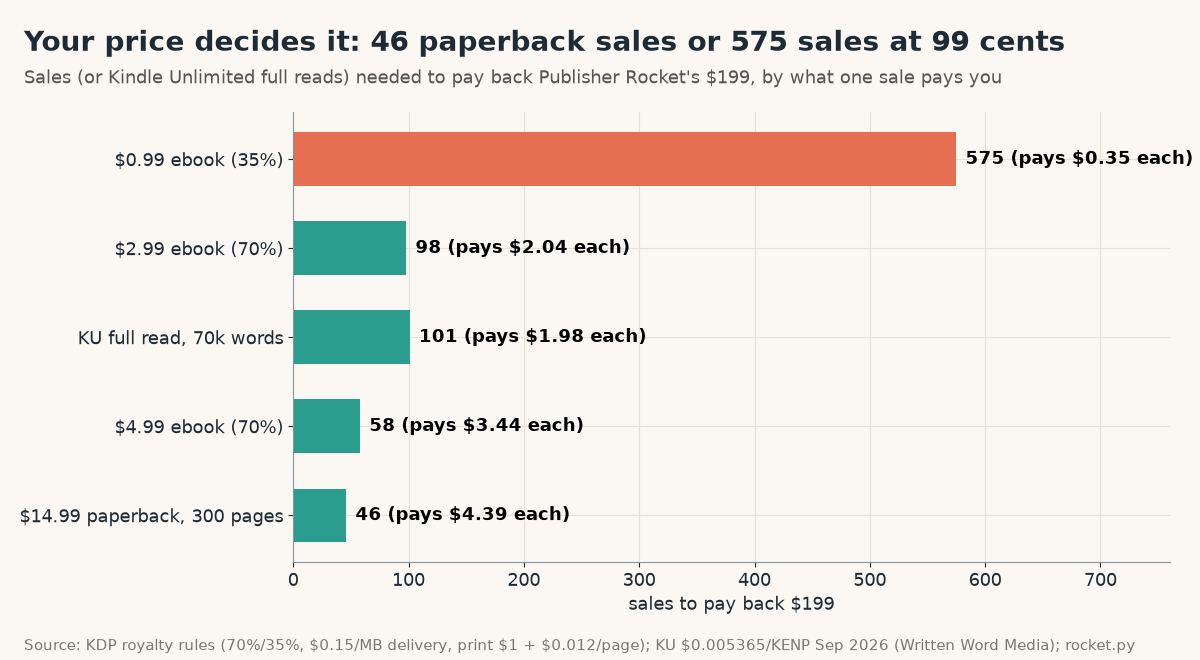
- $14.99 paperback (300 pages, $4.60 print cost): $4.39 a sale, 46 sales.
- $4.99 ebook: $3.44 a sale, 58 sales.
- $2.99 ebook: $2.04 a sale, 98 sales.
- KU full read of a 70,000-word book (about 368 pages at 190 words a page): $1.98, 101 reads.
- $0.99 ebook: $0.35 a sale, 575 sales.
So the same tool is cheap for a paperback-heavy nonfiction author and expensive for someone who only sells 99-cent ebooks. If most of your income is page reads, budget about 100 extra full reads.
Catalog size is what makes it worth it
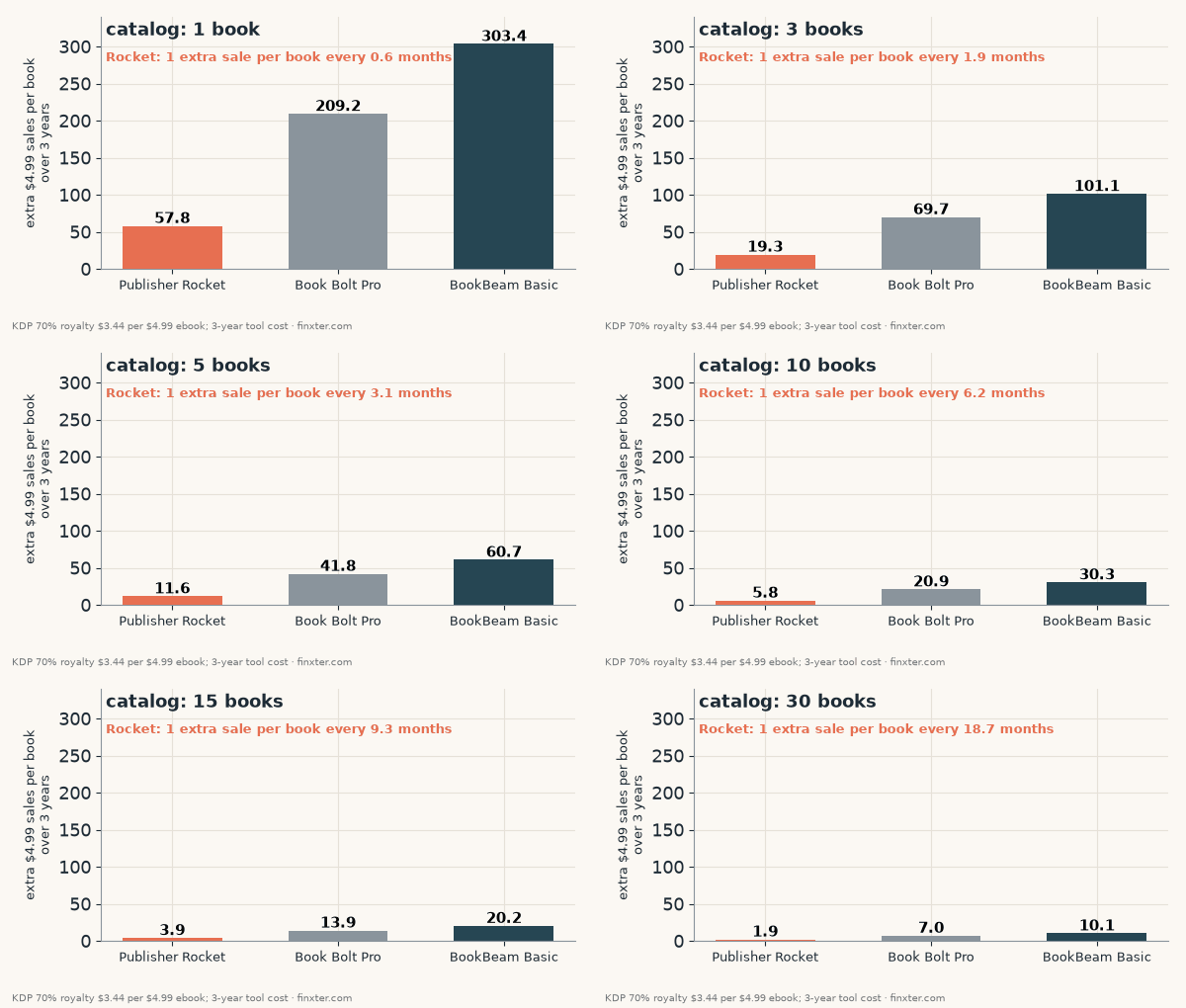
The question isn’t “will Rocket get me 58 more sales?” It’s “will it get each of my books a few more sales over three years?” Rocket’s price is fixed, so every extra book lowers the bar.
| Books in your catalog | Extra $4.99 sales per book over 3 years | That’s 1 extra sale per book every |
|---|---|---|
| 1 | 57.8 | 0.6 months |
| 3 | 19.3 | 1.9 months |
| 5 | 11.6 | 3.1 months |
| 10 | 5.8 | 6.2 months |
| 20 | 2.9 | 12.4 months |
| 30 | 1.9 | 18.7 months |
With one book, Rocket has to find you about 1.6 extra sales every month for three years. That’s a real lift for a book that sells a few copies a month. With 10 books, it only has to move each book once every six months, which one better category or one profitable ad keyword can do.
Compare that with a subscription: at 10 books, BookBeam Basic needs 30.3 extra sales per book over the same three years and Book Bolt Pro 20.9.
What the free route already gives you
Before you pay anything, know what’s free:
- Amazon’s search bar autocomplete shows what shoppers actually type. Rocket’s main addition is a monthly search estimate and a competition score for each phrase.
- Amazon Ads suggested keywords come with every Sponsored Products campaign.
- Category pages and the sales rank of their top 10 books are public. You can convert rank to sales with a sales rank calculator yourself; Rocket just does it for all categories at once.
So what you’re paying for is speed and the category view, not secret data. Search and sales numbers in every tool in this category are estimates, not figures Amazon reports. For worked examples of filling your seven keyword slots by hand, see these KDP keyword examples.
Use the refund window as your trial. Rocket’s 30-day money-back guarantee is the only free test you get. Do your category and keyword research for every book you have in those 30 days, then decide.
Search interest in these tools is falling
One more data point that no review mentions: BookBird lists US Google searches a month for each tool’s name, plus the 2026 trend. Five of the six research tools lost search interest this year.
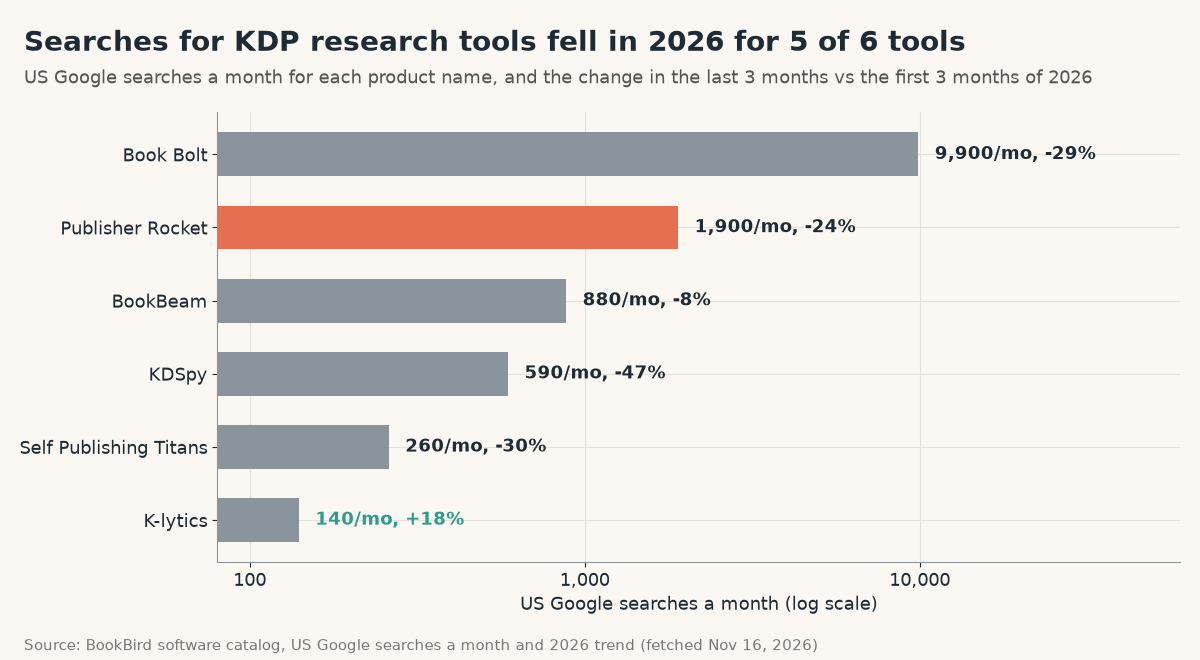
Publisher Rocket gets 1,900 searches a month, down 24%. Book Bolt is the most searched at 9,900, down 29%. Only K-lytics rose (+18%, from a small base of 140). Falling brand searches don’t make a tool worse, but they suggest fewer new authors are starting with a paid keyword tool, and that the vendor’s warning about a future subscription is worth taking seriously. If you want the one-time price, it’s the price available today.
Who should buy it, and who shouldn’t
Buy it if you have 5 or more books (or will within a year), sell ebooks at $2.99 or more, or run Amazon Ads, where the ad keyword lists save the most time. Do your category and keyword work inside the 30-day refund window so you know before it’s final.
Skip it if you have one book at 99 cents, mostly sell through a single Kindle Unlimited title, or need Reverse ASIN lookups at agency volume. Spend the $199 on the next book or a better cover instead.
Consider KDSpy if you only want Amazon-page research for the lowest price ($79), and accept that it lives in your browser rather than a separate app.
| Question | Answer (this article’s math) |
|---|---|
| Price | $199 one-time, 30-day refund (Nov 16, 2026) |
| Sales to pay back at $4.99 | 58 (46 paperbacks at $14.99; 575 at $0.99) |
| Per book with 10 books | 5.8 extra sales over 3 years |
| Cheapest subscription over 3 years | $540 (Titans Hobbyist) |
| Biggest limit | 50 Reverse ASIN searches a month |
| Verdict | Worth it from about 5 books or with Amazon Ads; skip for one 99-cent book |
Napkin math for a growing catalog
Say you publish a 6-book romance series in a year at $4.99, and you’d also launch the series with a launch plan and ads either way. Rocket needs 58 extra sales across all six books over three years: about 9.6 per book, or one extra sale per book every 3.7 months. If a better category placement for Book 1 alone gets you one extra sale a week, that’s 52 sales a year and Rocket is paid off in about 13 months, before counting read-through to the later books.
That’s the honest case for the tool: it scales with the size of your catalog, and costs the same whether you have 1 book or 30. The more books you publish, the less each one has to earn back.
FAQ
Is Publisher Rocket worth it?
For most authors with several books, yes. It costs $199 once and pays back after 58 extra $4.99 ebook sales, or 5.8 per book across a 10-book catalog over three years. For one 99-cent book it needs 575 sales, so skip it.
Is Publisher Rocket a one-time payment?
Yes, as of November 16, 2026 it is $199 one-time with a 30-day money-back guarantee. The sales page warns it may become an annual subscription later.
Is Publisher Rocket free?
No. There's no free plan, but the 30-day money-back guarantee works as a trial. Amazon autocomplete and Amazon Ads keyword suggestions are the free alternative.
What is the cheapest alternative to Publisher Rocket?
KDSpy Pro at $79 one-time is the cheapest paid option I found. The cheapest subscription, Self Publishing Titans, costs $180 a year, so it passes Rocket's price during year two.
Does Publisher Rocket have limits?
Its Reverse ASIN keyword feature is capped at 50 searches a month per author, resetting monthly. Keyword, category and competition searches have no stated cap.
Bottom line
Publisher Rocket is worth $199 for a working KDP publisher with several books, and a poor buy for a single cheap title. The break-even is 58 sales at $4.99, which shrinks to under 6 per book once you have 10 books. Every subscription alternative costs more by year two.
If more books is what would make tools like this pay off, ImagineYourBook drafts complete text-based books with a cover and carries characters into the next book of a series. The 7-day trial is $0 today with one 10,000-word book, but a card is required and the first $24.99 charge happens after 7 days unless you cancel before day 8. Edit every draft into your own book before it carries your name.
Sources (checked November 16, 2026 unless noted): Publisher Rocket sales page · Publisher Rocket Reverse ASIN credits · BookBird: Publisher Rocket (search volume, features) · BookBird software catalog (searches and trends) · BookBeam pricing · Book Bolt pricing · Self Publishing Titans pricing · BookBird: KDSpy · BookBird: K-lytics · Written Word Media: KDP per-page payouts · KDP eBook royalties. Assumptions: $4.99 ebook at 70% with a 0.5 MB file ($0.075 delivery fee) = $3.44; $2.99 = $2.04; $0.99 at 35% = $0.35; $14.99 paperback, 300 pages, print cost $1 + $0.012 per page = $4.39; KU full read of 70,000 words at 190 words per page and $0.005365 per page = $1.98; tools used for 3 years. US dollars before tax. Not affiliated with any tool listed.